
What is a Duplicate?
In a multi-show production, you sometimes want the same routine to appear in more than one performance — a featured number you want to give multiple audiences, or a special guest piece. ShowSort lets you mark routines as duplicates to formally tell the optimizer "these are intentionally the same routine in different shows."
Why Mark Duplicates?
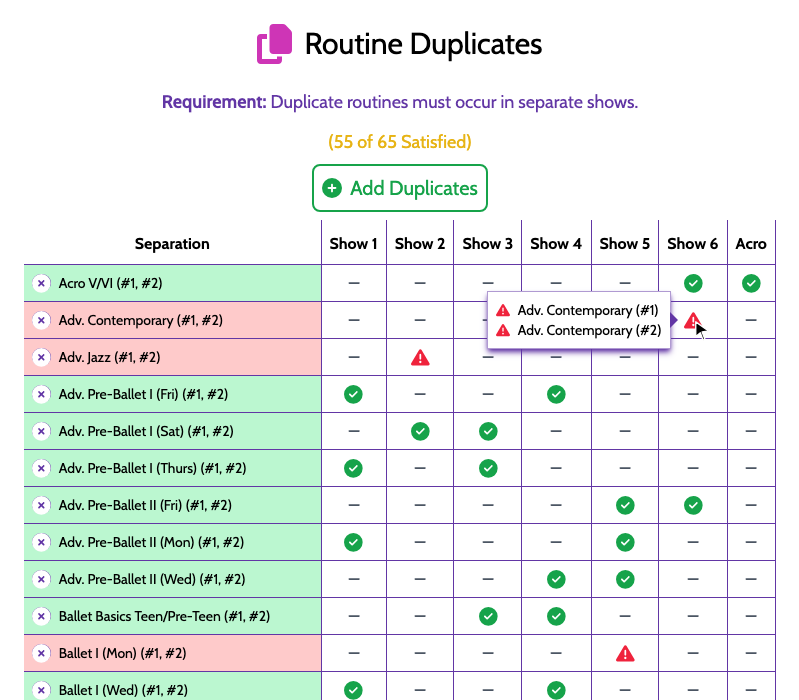
Once routines are grouped as duplicates, ShowSort checks a simple rule: the routines in a duplicate group must each appear in a different show. Two copies in the same performance would be a problem; this check makes sure that never happens.
Adding Duplicates
Click Add Duplicates in the panel. A window opens with two ways to define a group:
- Search for the routines yourself and add them one by one with the + button, then click Add Duplicates.
- Suggested Groups — ShowSort scans your routine names for common prefixes (e.g. "Shooting Stars - Saturday" and "Shooting Stars - Sunday") and suggests them as likely duplicate groups. Click the + next to a suggestion to accept it.
Satisfied / Unsatisfied
The panel header shows a count like "(3/4)" — that's how many of your duplicate groups currently meet the rule. Aim for a fully satisfied list before you finalize your show. Any unsatisfied groups are also listed in the "Hard Constraints Not Satisfied" Warning banner.
Removing a Duplicate Group
Each row in the Duplicates panel has a remove icon if you change your mind.