
The Problem
A show that's 100% Tap, then 100% Jazz, then 100% Ballet feels lopsided to audiences. Mixing styles throughout creates a better viewing experience.
What Mix It Up Does
Mix It Up lets you tag routines with a style (Tap, Jazz, Lyrical, Hip Hop — whatever categories make sense for your studio). The optimizer then tries to keep routines of the same style from appearing back-to-back.
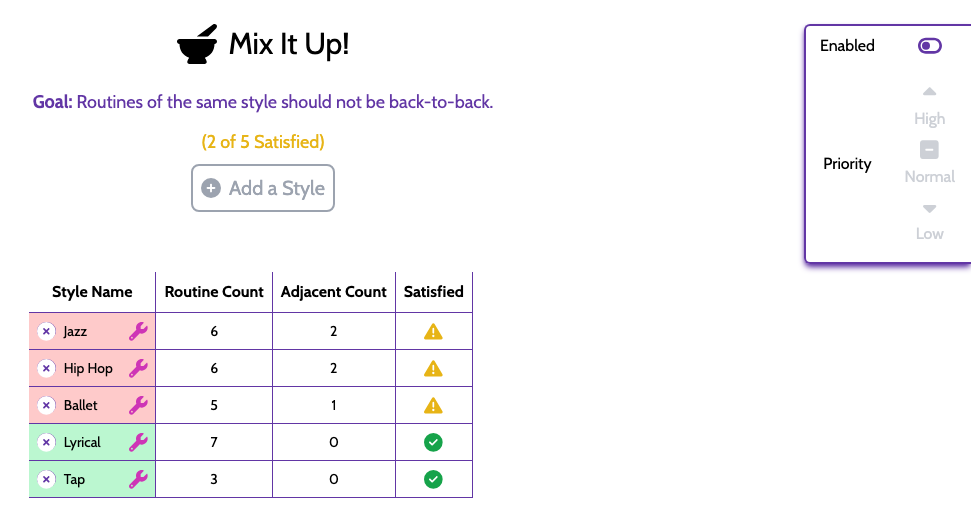
Adding a Style
Click Add a Style in the Mix It Up panel. Name it, then assign any routines that match. A routine can have at most one style.
How "Satisfied" is Calculated
For each style, ShowSort counts how many same-style routines ended up adjacent to each other in the optimized order. If the count is zero for a style, that style is "satisfied." The panel shows you "X of Y Satisfied" so you know at a glance how well the optimizer is doing.
Priority Controls
Mix It Up has its own on/off and priority setting in the panel. If you want ShowSort to really prioritize style separation (at the cost of a few extra quick changes), set Mix It Up to High priority. See Considerations for how priorities work.