
The Problem Links Solve
Imagine Emma is in both "Pointe" and "Ballet." Both routines require the same tights and a similar costume style. If the show order puts Emma's other routines between Pointe and Ballet, she has to change out of her Pointe tights into something else, then change back into essentially the same thing for Ballet. That's frustrating and unnecessary.
Linking tells ShowSort: "For any performer who's in both of these routines, don't schedule their other routines in between them."
How Links Work
When you link Routine A to Routine B, the optimizer ensures that for every performer appearing in both A and B, their individual performer schedule doesn't have their other routines sandwiched in between.
Important: Linking does not mean A and B will be back-to-back in the show order. In fact, that would create a zero-gap quick change! Other routines (ones the shared performers are not in) will naturally appear between the two linked routines. The key is that performers who share both A and B won't have their own routines in between.
Linking to an Intermission
You can link a routine to an intermission. This actually does cause the routine to be adjacent to the intermission, because all performers are resting during the intermission — so placing the linked routine immediately before or after it creates no quick change for anyone.
When to Use Links vs. Groups
- Links → for two routines that share performers with similar costume needs, where you want those performers' schedules to flow directly A→B
- Groups → for keeping a set of routines together as a contiguous block in the overall show order (not performer-specific)
Adding a Link
Click the gear icon on a routine card to open its settings, then click the Links row. The link editor opens, and you can connect this routine to any other routine (or intermission). Links are bidirectional — if you link A to B, it's the same as linking B to A.
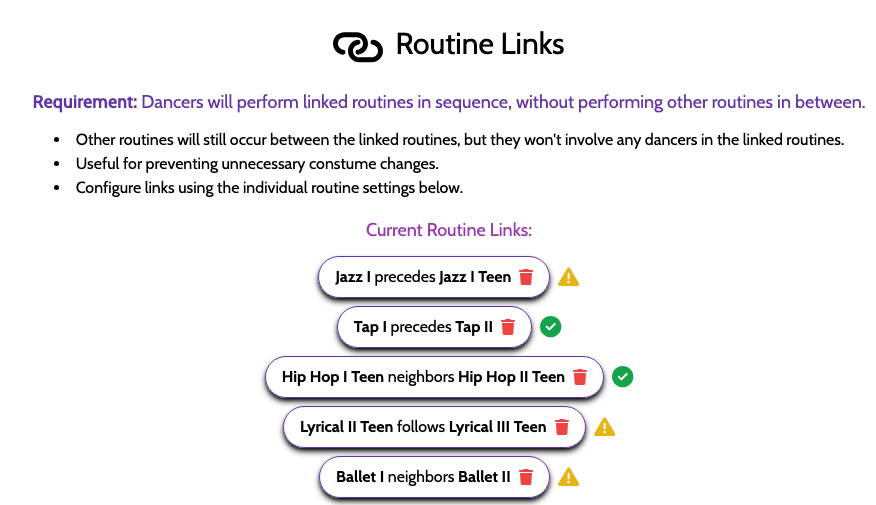
If a link can't be followed (for example, a neighbors link where the two routines can't sit next to each other), it'll show up in the "Hard Constraints Not Satisfied" Warning banner so you can fix it.