
What "Balance" Means
In a multi-show production, you want every performance to feel substantial — none of your audiences should walk out feeling like they got the "B-team" show. Balance is ShowSort's measure of how evenly performer workload is distributed across performances.
How It's Calculated
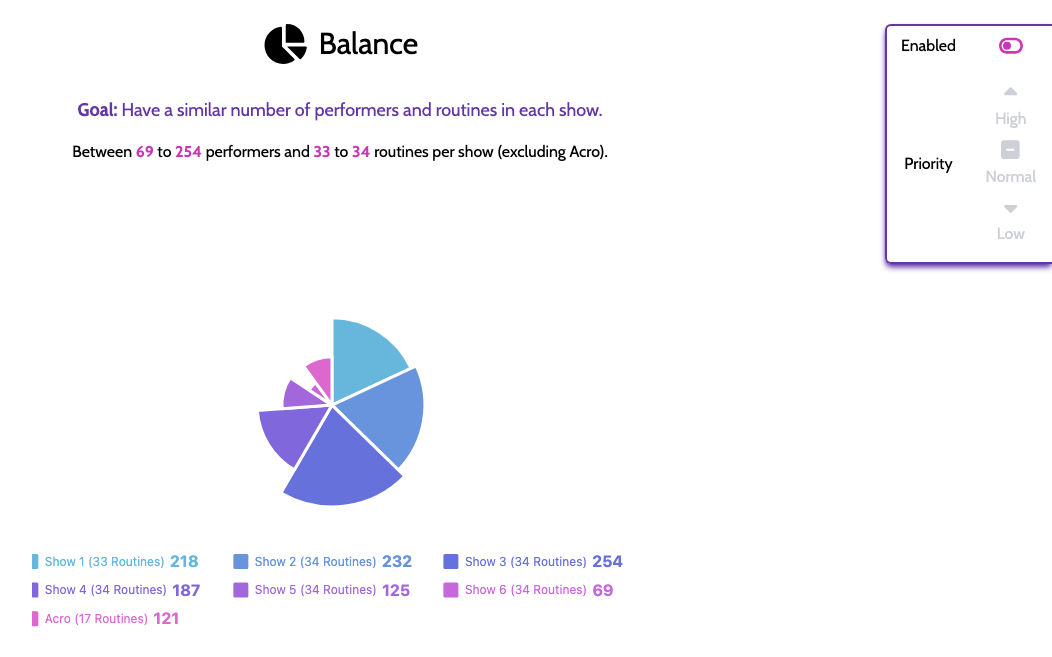
For each performance, ShowSort counts the number of unique performers appearing in that show — i.e., how many different people are on stage at any point during that performance. The Balance panel shows you this as a pie chart, plus min/max/average/range stats across your shows so you can see how even the workload is.
A performer is counted once per show they appear in (no matter how many routines they're in within that show). That makes Balance an "audience-feel / day-of-show staffing" measure rather than a routine-count measure.
Tuning Balance
Balance has its own on/off and priority setting in the panel. Set it to High priority if even workload across shows is your top concern — ShowSort will trade off other goals (like reducing quick changes) to keep shows even.
If you have Multi-Show Ignores, ignored shows are excluded from balance statistics. That means balance is computed from non-ignored shows only.
Balance vs. Flexible Show Sizes
These two settings work together — it's worth understanding how.
- You want specific shows to be different sizes (e.g., a longer Saturday evening, a shorter matinee) → turn Flexible Show Sizes off and set the size you want for each performance explicitly. Balance will then measure each show against the target you set.
- You want ShowSort to fully optimize family togetherness, appearance counts, and other goals → turn Flexible Show Sizes on so the optimizer can shift routines between performances instead of being pinned to a fixed size. In this mode, it's usually a good idea to also keep Balance enabled as a goal — otherwise the optimizer can produce odd distributions (one show much larger than the others) while chasing the other goals.
In short: Flexible Sizes gives the optimizer room to move; Balance is what keeps it from over-using that freedom.